Alerts
Alerts
In the Moonbot terminal, you can set up alerts for certain chart patterns (Price Line, Trend Line, Triangle, Fibo, Rectangle) to notify you when the price crosses the pattern. When an alert is triggered, the Moonbot terminal can perform various actions based on the settings in the Alerts window:
-
Sound an alarm
-
Show the “Detect” button with the coin's name
-
Activate the Alert strategy, which in turn can: place an order, trigger an action, send a notification via Telegram, and perform other actions.
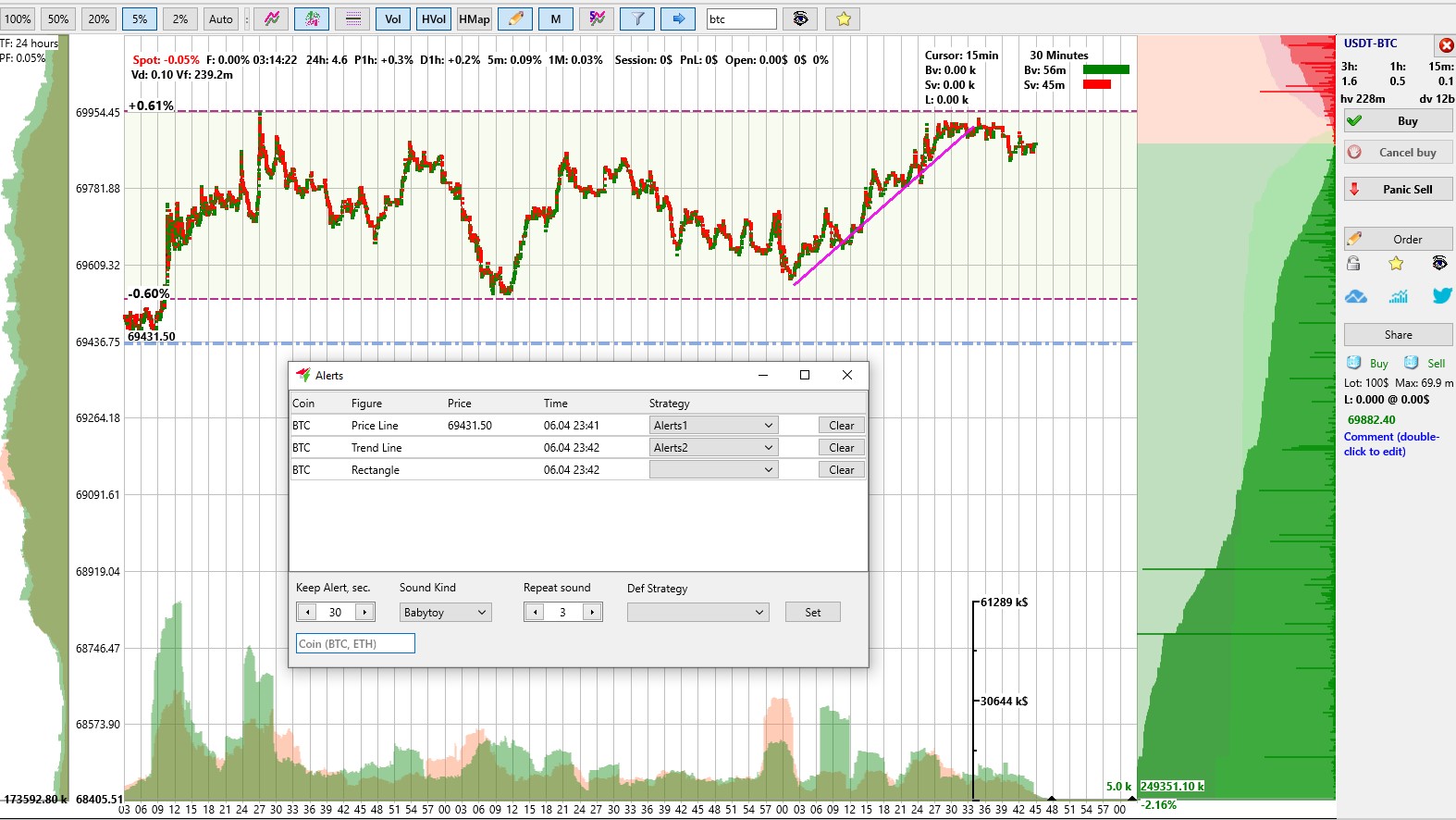
To set an alert on a coin chart, first draw any graphical element on which an alert can be set whilst holding down the CTRL key: Price Line, Trend Line, Triangle, Fibo, Rectangle.
Then right-click on this element or at one of its vertices and select Alert from the menu. The graphical element will then change colour and become a signal element.
If the price crosses the signal element, the alert will trigger.
If the alert was set without an Alert strategy, an audible signal will sound with the specified duration and number of repetitions. To the right, above the name of the trading pair, a ‘Detect’ button will appear showing the name of the coin on which the alert was triggered. By clicking on it, you can open the chart for that coin and, if necessary, make the appropriate trading decision.
If the alert was set up with an Alert strategy, the action will depend on the Alert strategy settings. More about the Alert strategy >>>
Alerts allow you to place graphical indicators on the relevant coins in advance, eliminating the need to constantly monitor the chart and check whether the price has reached important levels or not.
The Alerts window, displaying current alerts and settings, can be opened via:
-
Menu→ Alerts
-
Menu icon: Pencil (Drawing on the graph)
-
FAQ button → Alerts
-
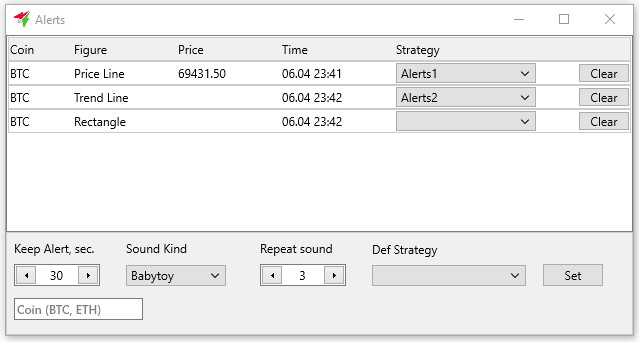
Coin - the name of the coin.
-
Figure - the type of chart pattern (Price Line, Trend Line, Triangle, Fibo, Rectangle).
-
Price – the price for the Price Line item.
-
Time - the time the alert is set, in the format MM.DD hh:mm.
-
Strategy - a menu allowing you to select an Alert strategy from the list to be linked to this alert; leave the field blank if no strategy is required.
-
Clear - button to clear the alert from the graphical element (without removing the graphical element from the coin chart).
-
Keep Alert, sec - duration of the alert in seconds (from 10 to 3600 in 10-second increments).
-
Sound Kind - a menu for selecting the type of sound alert.
-
Repeat sound - the number of times the sound alert is repeated (from 1 to 10 in increments of 1).
-
Def Strategy - a menu for selecting the Alert strategy or ‘none’ to set an alert without the Alert strategy.
-
Set - a button to apply the selected Alert strategy to all alerts in the Alerts window.
-
Coin name input field - for filtering alerts on the selected coin or coins by entering them separated by a space or comma.